




Quick links
SMSPool Business Account Explained
- By SMSPool Admin
- SMSPool

Scaling your operations often requires managing countless phone verifications. If you run a team or need bulk numbers without rate-limits on successful orders, unlocking our free business tier is the smart choice to make. SMSPool offers a tailored Business Account that provides exceptional benefits, keeping your operations organized and highly efficient.
Here is everything you need to know to get started.
The Perks of a Business Account
Gaining business account status unlocks a suite of powerful features designed to make team management and bulk ordering effortless:
- Zero Rate Limits on Successful Orders: Place as many orders as your business requires without hitting rate limits. Place as many orders as your business requires without hitting rate limits. Please note that accounts exceeding 300 requests per second for failed requests (such as ordering from out of stock services) will be rate limited). If you are ordering USA numbers, we suggest using the USA Foxtrot pool, which begins restocking at 5 AM GMT 1 every day.
- Sub-Account Creation: You can create multiple sub-accounts nested under your main profile. This is perfect for teams, departments, or individual employees.
- Daily Spend Limits: Set a daily spend cap on individual sub-accounts directly from your business panel, keeping team budgets in check and preventing overspending.
- Shared Benefits and Discounts: Your sub-accounts inherit the same perks as the business owner account. For example, if your main account receives a discount on USA Facebook numbers, all your sub-accounts automatically share that exact same discounted price.
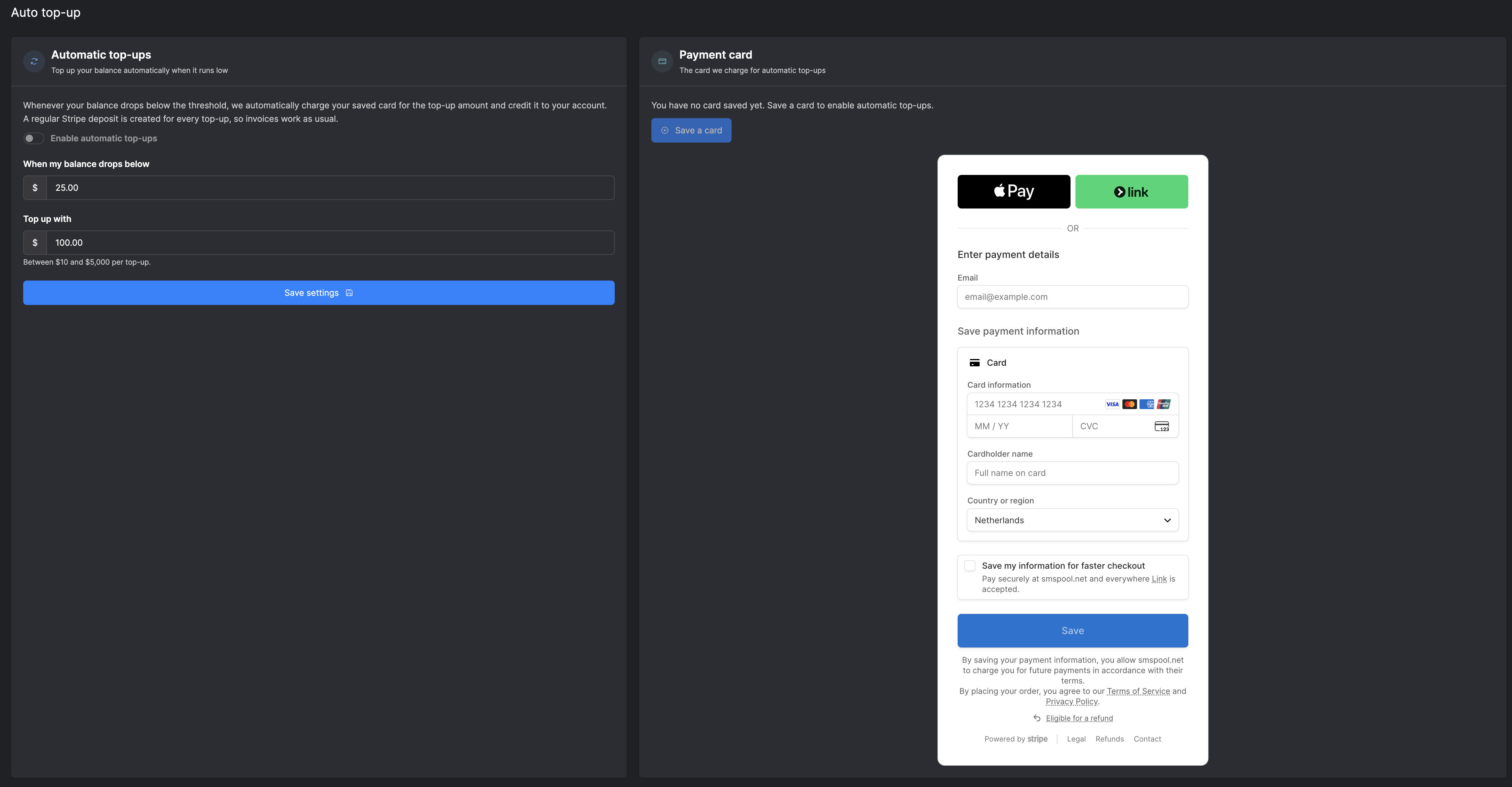
- Automatic Balance Top-Ups: Set a balance threshold and save a card to your account. When your balance drops below the threshold, we automatically charge your card for the top-up amount and credit your account straight away. Every top-up creates a regular Stripe deposit, so your invoicing works exactly as it does now. No more manual reloads or interruptions to your orders.
- Balance Management: You have the option to instantly credit your sub-account users' balances whenever they need funds, all from your main business account.
- Total Access Control: You retain the ability to disable sub-accounts if necessary, ensuring complete security over your business operations.
- Easy Password Resets: You can change your sub-accounts' passwords directly from your business panel, without needing to jump through recovery hoops.
Requirements for Approval
Applying is straightforward, and the best part is that transitioning to a business account is completely free.
To be eligible, SMSPool simply requires that your account has deposited $1,000 USD within a single month. This is strictly a one-time deposit. Once your business account is approved, it is yours to keep. You retain all of your business tier perks indefinitely, even if you do not deposit $1,000 in the following months.
During the application process, you will need to provide a few basic details to help verify your organization:
- Your SMSPool username
- Your full name
- A brief description of your business
- Your official website (If you have one)
- A valid email address
How to Apply
Ready to unlock your business account? To register for your free business account, please visit the official application portal here:
https://www.smspool.net/business/apply
Once approved and you are ready to make your purchases, you can head straight to the order page to begin utilizing your new zero rate limits on successful orders..
Feature Showcase: Managing Your Business Account
To help you get your operations running, we have put together a few quick video tutorials. These features can help streamline your business operations, and the clips below will show you exactly how to navigate your new admin panel.
Video 1: Creating a Sub-Account
Video 2: Funding Your Sub-Account
Video 3: Changing Your Sub-Account Password
Video 3: Disabling SMSPool Sub-Account
Screenshot 4: Automatic Balance Top-Ups
About the author
SMSPool Admin
The owner of SMSPool.net, a site that originally started as a hobby but saw rapid expansion due to the high demand, loves anything technology related and loves writing about technology related articles.
www.smspool.netOther interesting articles
List of unofficial SMSPool repositories
A list of unofficial SMSPool repositories integrated with our SMS verification API to improve your integration process
- By Admin
- June 27, 2022
Get SMS verification for WhatsApp
How to navigate WhatsApp verification with strategic use of temporary virtual phone numbers for enhanced online privacy.
- By Admin
- February 4, 2024
How to enable 2FA for your SMSPool account
In this guide, we will show you how to enable 2FA on your SMSPool account to keep your account secure.
- By Admin
- October 3, 2023
How to get a German phone number
Need a German phone number for Kleinanzeigen or SMS verification? Get a real non-VoIP +49 number online in minutes, no German SIM, address or ID required.
- By Admin
- July 31, 2026
OurTime Dating Phone Verification
Thinking about trying OurTime? Learn how this over-50 dating app works, how to stay safe, and how to verify your account without using your private number.
- By Admin
- March 7, 2026
How to disable pools on SMSPool
This guide showcases how to disable certain pools on SMSPool.net.
- By Admin
- November 11, 2025
Countries and services supported by SMSPool
This article provides a list of countries and services that are supported by SMSPool
- By Admin
- January 12, 2026