


Quick links
How to Share a Rental Number With Your Team
- By SMSPool Admin
- Guides
Team access lets you share a long-term rental with up to 10 teammates. They can read every message the number receives from their own SMSPool account, but can't extend, refund or change it. The rental stays on your account and is paid from your own balance.
Get a long-term rental for your team
Why Teams Need Shared Access
There's nothing stopping more than one person using the same SMSPool account, but we don't advise it for security reasons. Some services also link an account to a particular phone number, for example to provide one-time passwords, check who's logged in, and allow users to reset their password. In those circumstances, having more than one person able to use the account isn't straightforward.
If your team uses a common account (e.g. a seller account, or a set of advertising accounts), you may find that whichever member of the team has the number gets all the relevant codes, and other members have to wait while that person is unavailable - e.g. out of the office, in a meeting, or in a different time zone.
Before Team access was available, there were three solutions to this problem:
- Share the account details between members of the team
- Have one member of the team send relevant codes to a group chat
- Wait for the appropriate member of the team to become available
All of these have significant drawbacks, and the first two introduce additional risks to your account (e.g. codes or passwords may end up in inappropriate places).
What Is Team Access?
You can give up to 10 members of your team read-only access to one of your long-term rentals. Once added, they'll be able to see all the messages received by that number using their own SMSPool account.
They won't be able to extend, alter or refund the rental, and won't have any control over it. Ownership remains with you, and any payment will be taken from your account.
You can set up as many different long-term rentals as you need, with different sets of team members, if you have several accounts to protect.
If you only need one code, a one-time number may be more appropriate - these are designed for this purpose and expire relatively quickly. Team access only applies to long-term rentals.
What Your Team Can and Can't Do
As the owner of a long-term rental, you have greater control over it than your team. Other than extending, altering or refunding the rental, they'll be able to see exactly the same information as you.
| Action | Owner | Teammate |
|---|---|---|
| See the number | Yes | Yes |
| Read incoming SMS | Yes | Yes |
| Extend the rental | Yes | No |
| Refund the rental | Yes | No |
| Change the rental | Yes | No |
Following the principle of least privilege, we give users just enough permission to do their job - and nothing else.
So in this case, none of your team can let a number expire, refund it or alter its settings - except, of course, you! If you're happy to let certain members of your team view information, but not spend any money, then Team access is perfect - it lets you do just that.
Who Team Access Is For
There are many situations where it would be useful:
- Several people use the same account - social media, marketplace and/or ad accounts, to name but a few - and whoever is dealing with an account at any particular time needs access to the relevant rental.
- A support or ops team, where members need to be able to log in at any time (without seeking out a colleague with the right details) to deal with issues, and handovers between shifts shouldn't be a problem.
- An agency, where you may want to set up a separate long-term rental for each of your clients' accounts and give the appropriate staff access to them. If a client moves to a different account manager, the number stays the same, so nothing on the client's account needs updating.
- Remote staff in different time zones, who can get codes during their own working hours.
- Dev and QA staff who want to monitor the flow of SMS as they test. Where appropriate, our API can provide this information, or you can set up a long-term rental and give the right staff access.
Where only one person uses the account, there's no need for Team access - a single long-term rental should do.
Team Access vs Sharing Your Login
Giving your details to staff isn't as benign as it may appear. Anyone with them can view your balance and transaction history, buy new numbers, extend or refund existing ones and alter account settings - and potentially run up costs as a result, with no way of identifying who was responsible.
With Team access, each member of your team has their own account, and therefore their own login details, which won't need resetting when staff leave. You keep control of your own password, and can turn on two-factor authentication in your account settings without passing details to anyone else.
Finally, it's easier to assign responsibility when staff have their own accounts. It's clear who has done what, which isn't possible with shared details.
Which Countries Can I Rent a Number In?
Team access works on any long-term rental, whichever country it's from. Rentals are currently available in:
- Australia (Virtual)
- Canada (Virtual)
- Hong Kong
- United Kingdom
- United States (2 providers)
Available countries, rental lengths and prices can change, so check our long-term rentals page for the latest.
How to Add Teammates to a Long-Term Rental
It shouldn't take you more than a couple of minutes to do this...
- Log in and go to the rentals page to buy a long-term rental, or use a long-term rental you already have
- Make sure each member of your team has their own SMSPool account, and get their SMSPool username
- Under Active rentals, click Manage on the number you want to share

- This opens the rental with all of its messages - find Team access in the bottom right
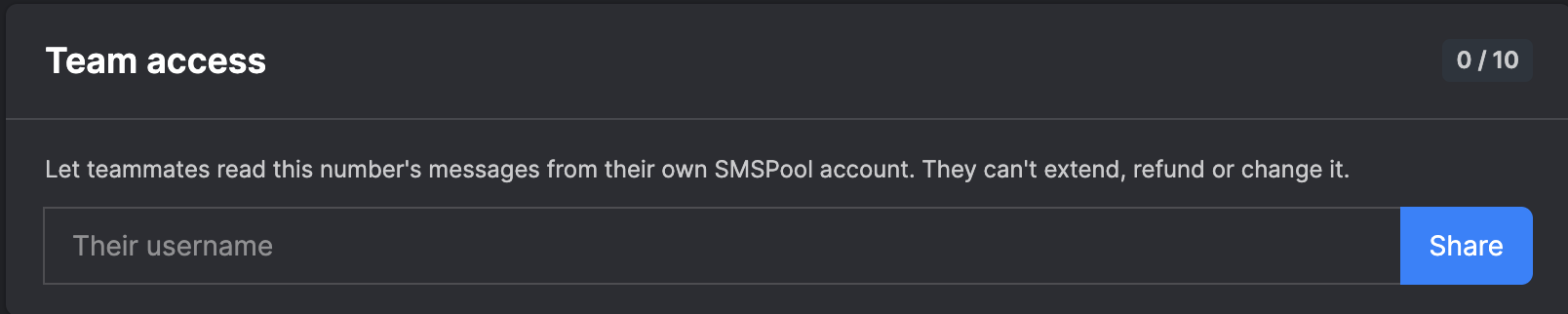
- Enter your teammate's SMSPool username to add them (up to 10 members)
- And... they're able to view the rental and any messages it receives
There's nothing else they need to do - they just need an account and to give you their username.
Tips to Get the Most Out of a Shared Long-Term Rental
- Use one long-term rental per shared account (e.g. one seller account) - codes for several accounts on one number are harder to tell apart.
- Make sure the rental stays extended, as team members can't do this - turning on auto-extend means it won't expire.
- Limit access to those who need it - apply least privilege.
- Protect your account with two-factor authentication - you're the only person able to alter or refund the rental.
By following these tips, you can give your team access to codes in a controlled and safe way.
Further Questions
Do they need an account?
Yes - you add teammates by their SMSPool username, and the rental and its messages are only available to users with their own account. Registration shouldn't take longer than a minute.
How many people can I give access to?
Up to 10. If you need to give access to more people, you'll need another long-term rental.
Can I remove a teammate?
Yes - you can remove teammates from Team access whenever you need to, for example when someone leaves or moves to a different client.
Can they extend, refund or alter the rental?
No - they can view it, but aren't able to take any action on it.
Can they view any other details on my account?
No - they're only given access to that one rental.
Who pays for it?
You - the rental stays on your account, and any additional time is taken from your balance.
Can I share a one-time number?
No - Team access is only available on long-term rentals.
Will they see all the messages the rental receives?
Yes - every message you can see will also be visible to your team.
Do I need to share my account details?
No - that's the benefit of Team access. They use their own account, and you're safe!
Set Up Team Access Today
Don't expose your account details or waste time passing codes around. Get yourself a long-term rental, add your team, and they can view codes in their own right.
Set up a shared long-term rental
Return to knowledgebaseAbout the author
SMSPool Admin
The owner of SMSPool.net, a site that originally started as a hobby but saw rapid expansion due to the high demand, loves anything technology related and loves writing about technology related articles.
www.smspool.netOther interesting articles
How to register on Stir Dating
Want to try the Stir dating app? Find out how to meet other single parents safely and register your account without giving away your private phone number!
- By Admin
- March 4, 2026
SMSPool Mobile App Installation Guide
This guide showcases how to install our mobile apps your iPhone or Android.
- By Admin
- November 20, 2025
SMSPool now accepts Cash payments!
SMSPool introduces the option to pay with cash, making transactions more flexible for users
- By Admin
- August 22, 2025
Changes regarding certain services
SMSPool is undergoing changes regarding certain service purchases
- By Admin
- October 24, 2025
How to Request a Bulk Discount on SMSPool
Looking to buy SMS verification numbers in bulk? Learn how to request a custom discount on SMSPool.
- By Admin
- March 7, 2026
Why is my phone number marked as VoIP
Your phone number won't work with an online service? This is due to it being a VoIP phone number, but what makes a phone number VoIP and how do they know?
- By Admin
- June 3, 2022
How to get a Snapchat SMS verification
This guide will show you how to sign up to Snapchat without a phone number.
- By Admin
- March 22, 2023