


Quick links
SMSPool Extension for Chrome and Firefox
- By SMSPool Admin
- News

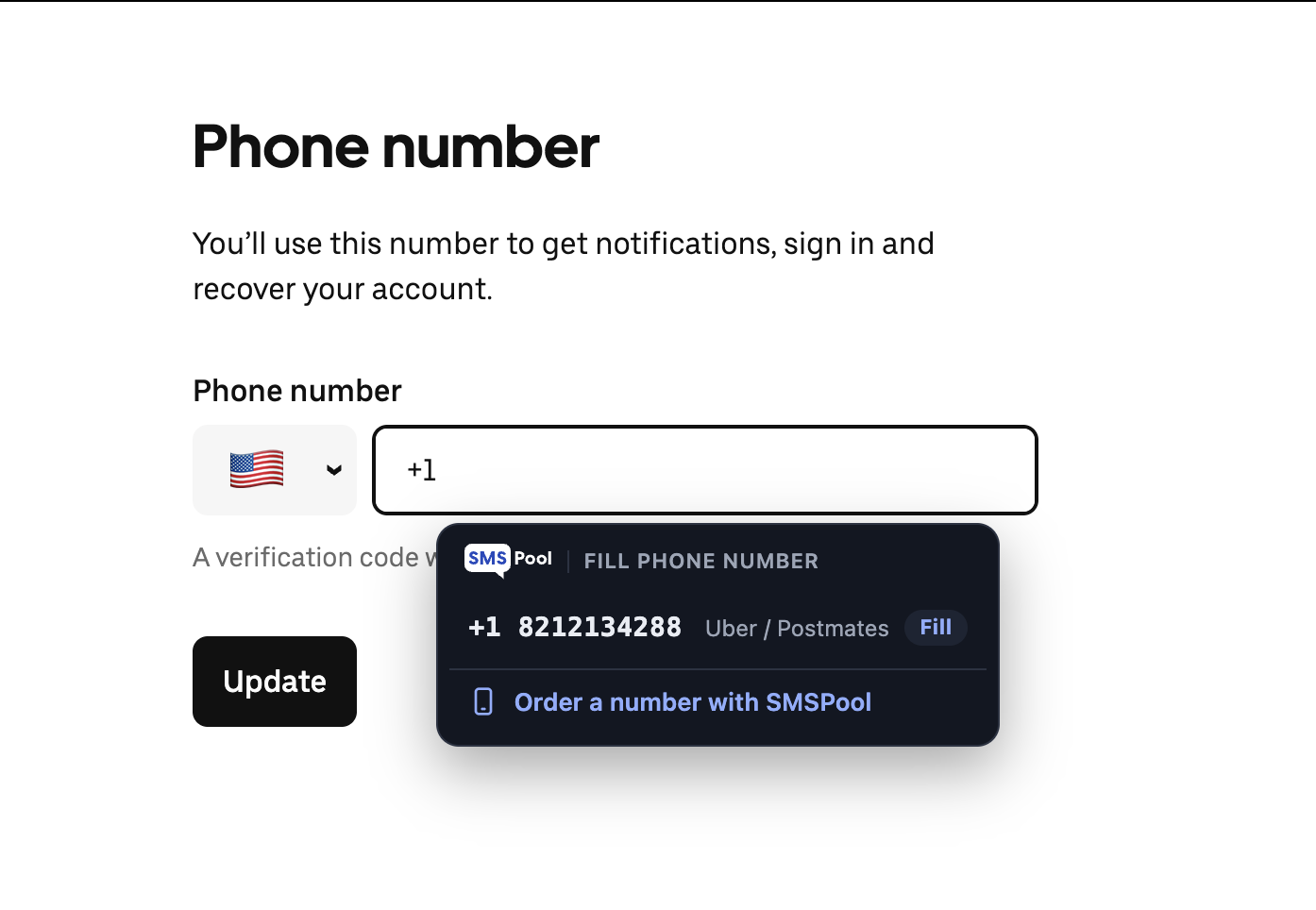
The SMSPool browser extension lets you buy a number, get your code and fill it into a sign-up form without leaving the page you're on. It's available on Chrome and Firefox:
So What Does It Do?
As well as the obvious benefit of saving you having to jump around to different sites to complete an account setup, the extension provides some other useful functionality too:
- You can buy one (or more) numbers for any of the services we support
- Once you've received the relevant SMS, the number and/or code can be inserted directly into a form
- You can manage your orders - refund, resend, reactivate or archive them and see their details
- You can see your account balance and order history in exactly the same way as on the website, and in our apps
And there's plenty more functionality to come...
How to Use It
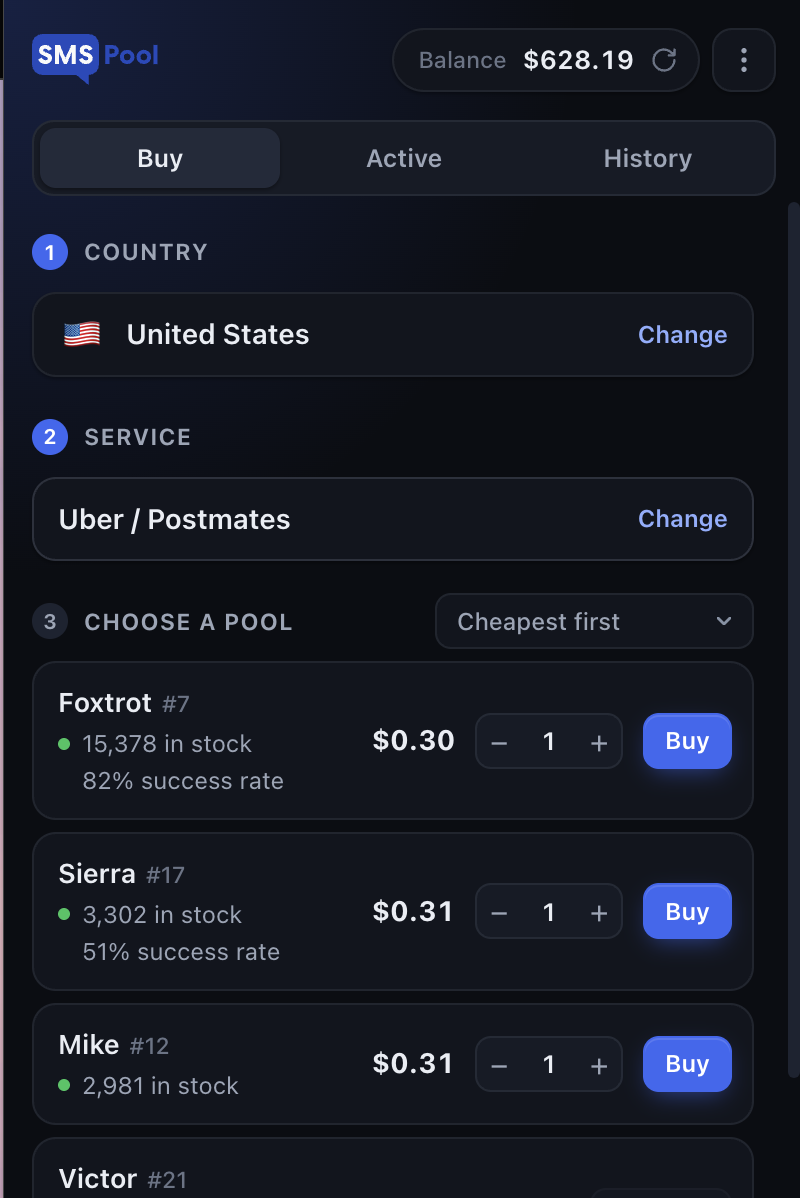
Simply open the extension and select a country and service - you can 'star' those you use most, so they appear at the top of the list and you won't need to hunt for them each time.
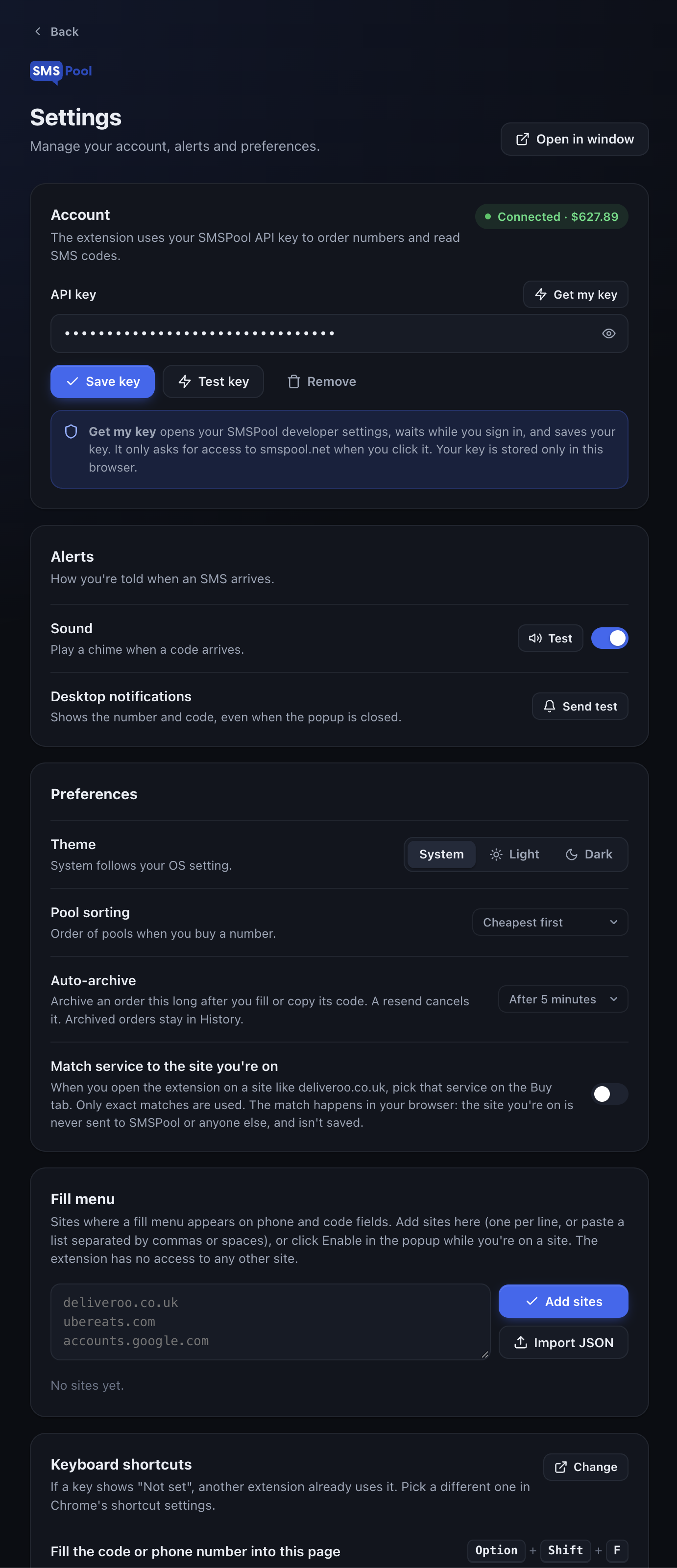
There's an option to 'match service to the site you're on', which will pick the relevant service for you (e.g. open the extension whilst on a site such as deliveroo.co.uk and it'll pick that service for you on the 'Buy' tab). This information is held in your browser and doesn't get passed to SMSPool, nor saved.
Prior to buying, you can view details of different pools, including their price and success rate on that particular service - some pools will be less expensive, others more reliable. Having this information enables you to make an informed decision as to which to use, depending upon your requirements.
You can purchase more than one number at a time, if required. Again, these orders are no different to those placed via the website, and will be reflected in the relevant areas and subject to the same rules. Should you prefer to use the website to place orders, our SMS verification page operates in exactly the same way.
Receiving Your Code
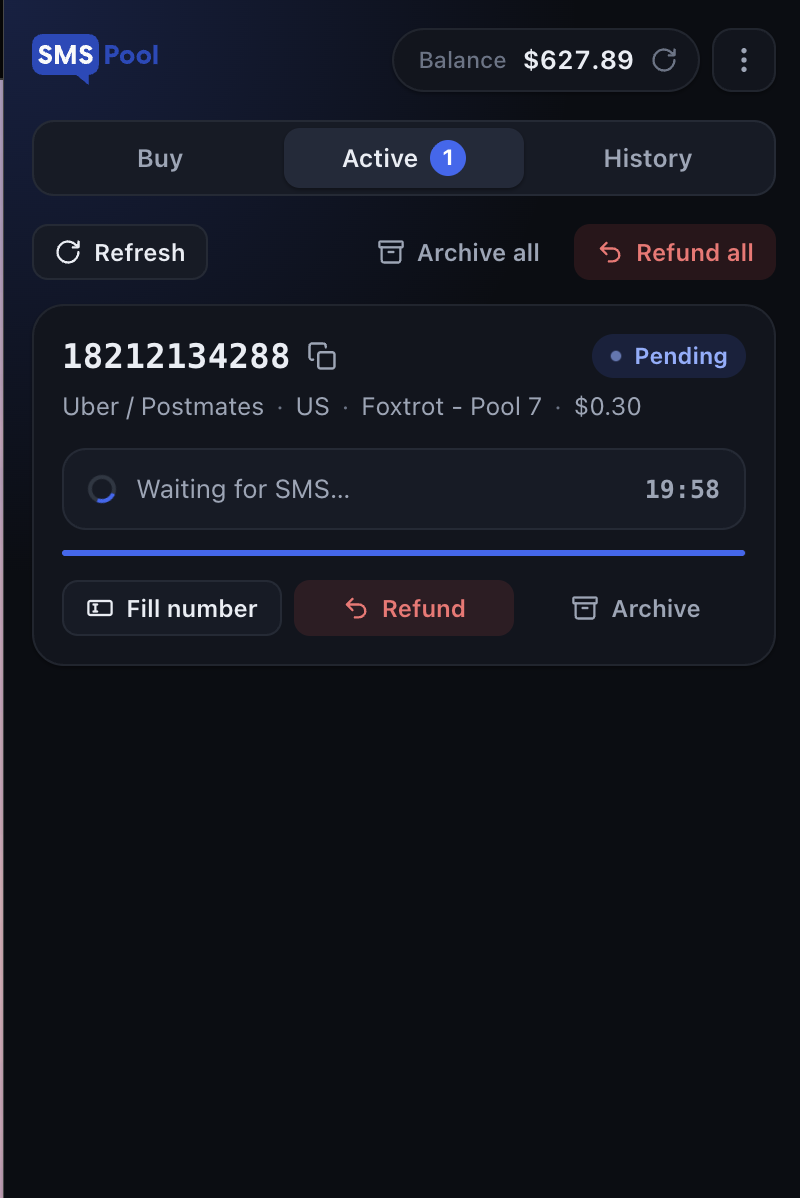
As soon as you receive an SMS, the relevant details will be displayed in the extension, enabling you to quickly and easily obtain the information required.
There's an associated desktop notification (which you can configure to include an audible alert), which will fire regardless of whether the extension is open or not. This lets you carry on working in other applications or tabs, and still know when your code arrives.
There's no need to highlight the relevant information, or worry about incorrect formatting, spaces or typos - everything can be copied with a single click.
On the website, you'll be waiting on the order page for your code. With the extension, you can wait anywhere.
If you verify lots of accounts regularly, the extension should save you considerable time, but if you only do so occasionally, it'll at least mean you don't need to visit the website each time.
Autofill Numbers and Codes
Just as a good password manager should, the extension can autofill information for you. There are several ways to do this:
- Click fill in the popup
- Press Alt Shift F (Option Shift F on Mac)
- Right-click the relevant field and select SMSPool from the menu
In addition, you can set up a 'fill' menu for particular sites. This will appear under phone number and code fields, showing the correct number for that site, waiting for an SMS and then filling in the relevant code for you. If you don't have a suitable number yet, you'll be able to order one directly from the menu.
Numbers you buy will only appear in the right places - a number purchased for Deliveroo will only be offered on Deliveroo, so you won't be tempted to use the wrong one.
Of course, this fill menu isn't enabled by default - you need to set it up for particular sites, and elsewhere the extension won't do anything unless you tell it to.
Manage Every Order
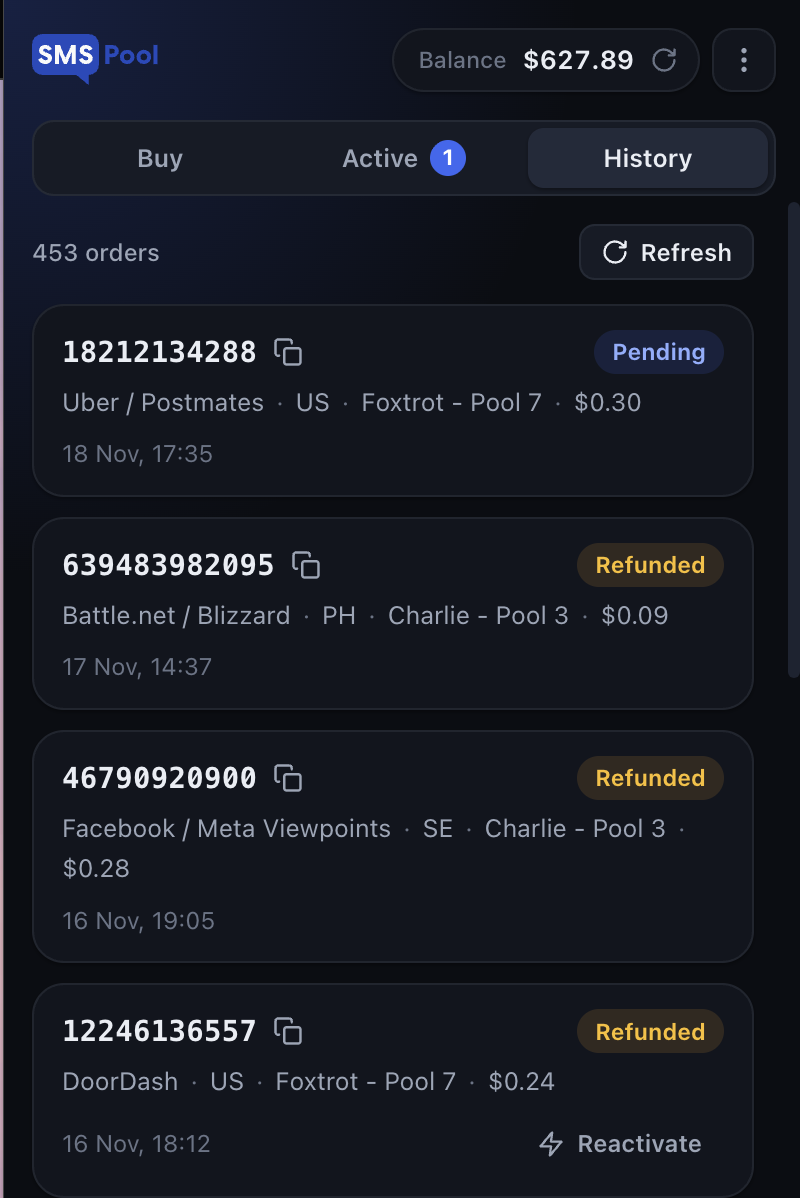
All the functions available on the orders page are available via the popup. You can:
- Refund numbers which haven't received an SMS
- Resend a code (with the cost shown before you confirm)
- Reactivate Foxtrot numbers which haven't received a code
- View your complete order history
Orders are automatically archived a short time after use, to keep the popup neat and only show relevant information. You can adjust this time, or disable auto-archiving entirely.
For longer term requirements - say where you may need to return to a number after weeks or months - a one-off purchase won't be appropriate, and you should consider our long-term rentals.
How to Install The SMSPool Web Extension
It shouldn't take more than a minute to get set up.
- Find SMSPool on the Chrome Web Store or Firefox Add-ons and click Add to Chrome or Add to Firefox
- Pin the extension to your toolbar for easy access
- Open the extension and click Get my key
- The extension will read your API key from your SMSPool developer settings and link your account
Alternatively, you can enter your key manually - it's located in your account settings.
You'll need an SMSPool account in order to use the extension, so please set up an account, add some funds and link it if you haven't already.
Your API key is similar to a password, in that anyone with access to it can act on your account, so treat it accordingly - don't reveal it to others, and don't post it elsewhere.
Built for Privacy
As with SMSPool itself, we’ve built the extension to do its job, and nothing else.
Your API key remains within your browser - it's only ever sent to the SMSPool API.
The extension only interacts with a site when you tell it to fill in some information - either where you've asked it to, or where you've enabled the 'fill' menu on a particular site.
We don't see any of the sites you visit, and there's no analytics, no adverts and no other forms of tracking.
Given the nature of tools like this, that's important. To provide useful functionality they need some insight into the sites you visit, and it's fair to ask how they use that information - ours only deals with the fields you tell it to.
Other features include light and dark themes, and the ability to keep the extension open alongside your work using a pop-out window. Further information is provided in our privacy policy.
Chrome, Firefox and Other Browsers
Both Chrome and Firefox versions of the extension are currently available, and behave identically.
Many other browsers built on the Chromium open-source engine allow installation of extensions from the Chrome Web Store, including Brave and Microsoft Edge - some will require you to enable this first.
If you're on a phone, our iOS and Android apps give you access to the same orders and balance.
FAQ
Is the extension free?
Yes - there's no charge to download and use it, although you will need to pay for numbers. These cost exactly the same as ordering on the website.
Do I need an SMSPool account?
Yes - the extension uses your API key to connect to your account, so you'll need to register with us first. Your balance and orders are shared between the extension, the website and our apps.
Where can I find my API key?
Select 'Get my key' within the extension and it will be retrieved for you. Alternatively, you can find it in your account settings and paste it in.
Is there a version for Firefox?
Yes, and the functionality is identical to the Chrome version. You can get it from Firefox Add-ons using the link at the top of this page.
Will it work on Brave or Edge?
In most cases it should - many Chromium-based browsers allow installation of extensions from the Chrome Web Store, although some will require you to permit this first. If you run into any trouble, Chrome or Firefox are the safest options.
Will I know when my code has arrived?
Yes, you'll receive a desktop notification (with the option to add a sound) whether or not the extension popup is open. You can send a test notification from the extension's settings to make sure it's working.
What's the autofill keyboard shortcut?
Alt Shift F (Option Shift F on a Mac). You can also use the right-click menu or the popup. If the shortcut shows 'Not set', another extension is already using it, and you can pick a different one in your browser's shortcut settings.
Do you track which sites I visit?
No - the extension only interacts with a site where you've asked it to, or where you've enabled the 'fill' menu. Nothing about the sites you visit is sent to SMSPool or anyone else.
Can I get my money back?
Yes, you can refund numbers that haven't received an SMS straight from the extension popup. You can refund all eligible active orders at once using Refund all.
How much does a resend cost?
It varies according to your order - you're shown the cost before confirming, so there should be no nasty surprises. The charge is taken from your SMSPool balance, just like on the website.
Can I stop orders being archived?
Yes - you can adjust the time before orders are automatically archived, or turn it off. Archived orders aren't deleted - you can still find them in the History tab.
Does it work on my phone?
No, it's only available for desktop browsers. Use our iOS or Android app if you're on a mobile device.
One Place to Buy, Get and Complete Codes
After installing the extension and linking it to your account, you can go straight to any sign-up you need.
Return to knowledgebaseAbout the author
SMSPool Admin
The owner of SMSPool.net, a site that originally started as a hobby but saw rapid expansion due to the high demand, loves anything technology related and loves writing about technology related articles.
www.smspool.netOther interesting articles
Tilt SMS Verification Tutorial
Tilt asking for SMS verification? Get a real non-VoIP number that Tilt accepts, keep your personal number private, and verify the app in a couple of minutes.
- By Admin
- August 20, 2026
Improve your privacy using SMSPool
How to improve your privacy and prevent scammers from getting access to your personal information using our temporary SMS verification
- By Admin
- February 2, 2022
Battle.net Sign Up Without a Phone Number
Stuck on the Battle.net phone verification step? Learn how to securely register a Battle.net/Blizzard account without a personal phone number using SMSPool.
- By Admin
- April 5, 2026
How to get a Bolt SMS verification
In this guide, we will show you how to verify your Bolt account using our Bolt SMS verification service without using your phone number for Bolt.
- By Admin
- May 28, 2023
SMSPool Social Media Pages
Here is a comprehensive list of social media platforms where we maintain active accounts
- By Admin
- July 10, 2025
Official SMSPool Resellers
Looking for alternative ways to buy SMSPool credit? Find our list of official resellers through this article.
- By Admin
- August 27, 2025
The Future of Android Sideloading
Sideloading on Android is changing in 2026. Discover how Google's new developer verification rules will impact open-source apps, digital privacy, and your phone
- By Admin
- March 16, 2026