




Quick links
How to Export Your SMSPool Account Data
- By SMSPool Admin
- Your Account
Your SMSPool account data belongs to you. Whether you want to keep records of your order history, review your usage, or simply have a local backup, exporting your data takes less than 30 seconds.
Why Export Your Data?
A full data export gives you a broader overview of your SMSPool account all in one file. SMSPool already allows separate export of your order history, but this complete version covers more than just phone number orders. Exporting your full account data means you always have an offline copy to hand, whether you need it for your own records, accounting, or just peace of mind.
What You Need
- An SMSPool account
- A web browser
How to Export Your Data
Step 1: Log in to your SMSPool account
Head to SMSPool.net and log in with your credentials.
Step 2: Go to the Settings Menu
Click the Settings cog icon on the top right of the Dashboard.

Step 3: Click Account Settings
Click Account Settings
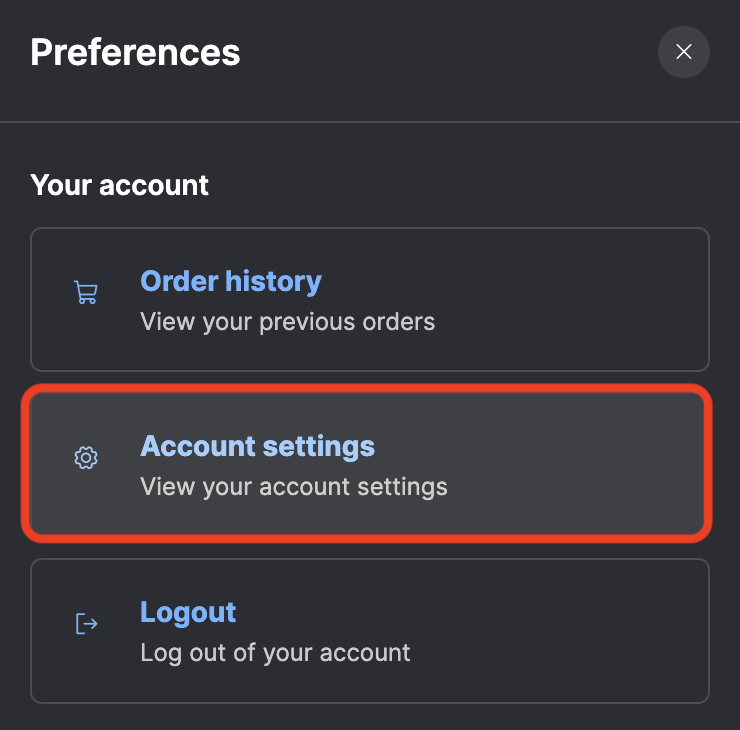
Step 4: Download your data
Scroll down until you see the Download My Data (JSON) button. Click the download button and your data file will be prepared and downloaded instantly.

What's in the Export?
Your data is exported as a JSON file, JSON is a widely supported format that can be opened with any text editor, spreadsheet tool, or imported into other applications. It contains a full overview of all of your account data at the time of exporting.
Frequently Asked Questions
Is there a limit to how many times I can export my data? No. You can download your data as many times as you need.
Does exporting my data delete anything from my account? No. Nothing is removed from your SMSPool account.
What can I use the JSON file for? You can open it in a text editor to review it directly, import it into a spreadsheet tool like Excel or Google Sheets for analysis, or store it as an offline backup of your account history.
I downloaded the JSON file but cannot open it. What do I do? JSON files are plain text. If your system does not open them automatically, right-click the file and choose "Open with", then select any text editor such as Notepad (Windows) or TextEdit (macOS).
Return to knowledgebaseAbout the author
SMSPool Admin
The owner of SMSPool.net, a site that originally started as a hobby but saw rapid expansion due to the high demand, loves anything technology related and loves writing about technology related articles.
www.smspool.netOther interesting articles
How to Get a Japanese Phone Number for SMS
Get a real, non-VoIP Japanese phone number for SMS verification in seconds. No ID or residency needed. Works with Pokémon Center, Mercari, Yahoo Japan and more.
- By Admin
- June 14, 2025
How to setup webhooks for SMSPool
Set up your webhook for SMSPool, which works for Slack, Discord, and custom endpoints.
- By Admin
- April 6, 2025
Voi SMS Verification Tutorial
Voi asking for SMS verification? Get a real non-VoIP number that Voi accepts, keep your number private, and verify the app in a couple of minutes.
- By Admin
- August 27, 2026
How to Recover a Lost SMSPool Account
Lost your SMSPool login? Learn how to reset your password or recover your SMSPool account.
- By Admin
- December 23, 2025
How to get a German phone number
Need a German phone number for Kleinanzeigen or SMS verification? Get a real non-VoIP +49 number online in minutes, no German SIM, address or ID required.
- By Admin
- July 31, 2026
Coffee Meets Bagel SMS Verification Guide
Coffee Meets Bagel asking for SMS verification? Get a real non-VoIP number it accepts, keep your personal number off your dating profile, verify in minutes.
- By Admin
- September 4, 2026
How to enable 2FA for your SMSPool account
In this guide, we will show you how to enable 2FA on your SMSPool account to keep your account secure.
- By Admin
- October 3, 2023